AI Receptionist for Small Business: Set Your Booking Rules
A customer calls while you are on a job. They want an estimate, and you would like them to leave the conversation with a clear next step.
An AI receptionist may help handle that inquiry. But before you connect it to your calendar, decide which commitments it should be allowed to make. A booking reserves your team’s time and sets an expectation with the customer.
Here is how to define a sensible first booking workflow.
Start with one appointment type
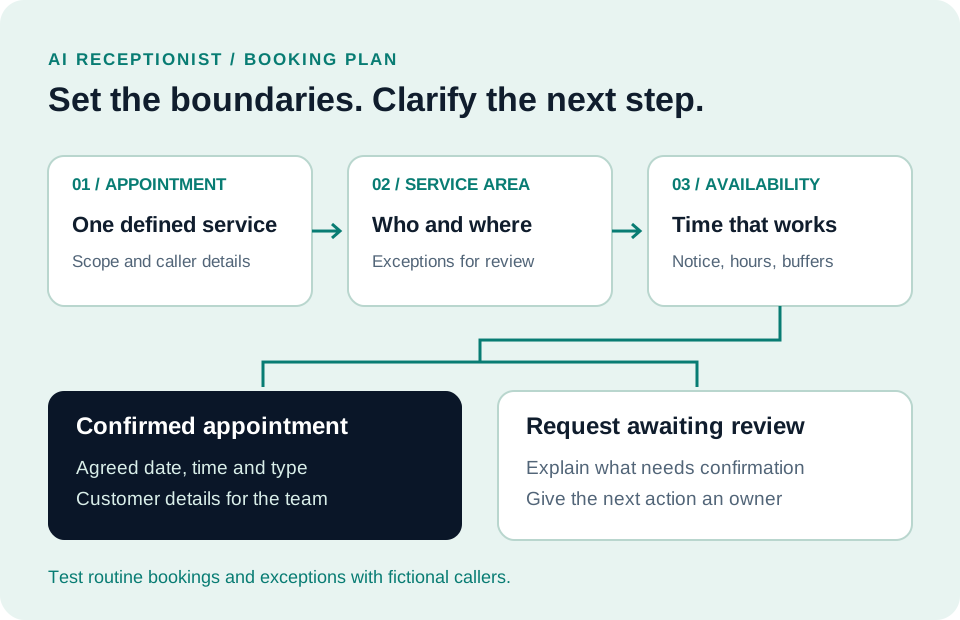
Choose a service that is straightforward to schedule: an introductory consultation, an estimate visit, or a discovery call.
Write down exactly what the appointment includes. For example, a roofing estimate visit does not automatically include repair work, a final price, or a promise that materials are available.
Keep those boundaries in the language callers hear. If the appointment is an assessment, call it an assessment. Avoid letting “you are booked” imply that the full job has been approved.
Define who and where you serve
List the practical requirements for that appointment:
- The service the caller needs
- The area your team covers
- Whether the request concerns a new or existing job
- The details your employee needs before arriving
Decide which answers require a person to review the request. An address outside your normal service area, an unclear job description, or a question about an existing project may need a callback.
Ask your provider to demonstrate how those cases are handled. Confirm which rules can be configured and which steps remain manual.
Make calendar availability realistic
An empty slot can still be unsuitable for a visit. Your team may need travel time, preparation time, or a specific employee.
Document appointment length, booking notice, business hours, time zone, and any buffers you need. Decide who keeps availability current when someone is away or a job runs long.
Have the provider show how your calendar setup handles those requirements. If a needed rule is unsupported, settle on a workable process before opening that appointment type to callers.
Separate a request from a confirmed booking
Choose clear wording for two different outcomes.
A confirmed appointment should have an agreed date, time, appointment type, and customer details. A request awaiting review should explain that a person still needs to confirm it.
For changes or cancellations, establish who owns the next step. Ask whether the proposed setup can handle them directly or should route them to your team. Do not promise automatic rescheduling without seeing it work.
Keep the next person informed
The employee taking the appointment should be able to understand what the caller requested and what was promised.
Specify the information you need on the customer record: contact details, reason for calling, appointment outcome, and any question awaiting a response. Collect only what is needed for that interaction.
Our guide to CRM follow-up and lead handoffs explains why the next action needs a clear owner, even after the initial response.
Test the boundaries before expanding
Use fictional callers and a test calendar. Try a routine booking, an unavailable time, an out-of-area request, and a caller who asks for something outside the appointment’s scope.
Check the actual calendar entry and the information your employee receives. Track gaps and resolve them before adding more services. You can include these rules in your one-page CRM implementation brief.
Bring your booking rules to a Straton walkthrough
Straton CRM’s AI receptionist can answer inbound calls, collect customer details, check configured availability, and book a confirmed appointment into the CRM calendar.
That workflow requires an enabled voice agent, connected phone routing, and configured calendar availability. Voice and messaging usage charges apply.
Book a walkthrough with SB Help Group. Bring one appointment type, your service area, and your current calendar process so we can discuss the configuration and costs for your business.